OBD2 freeze frame data is a snapshot of engine readings — RPM, speed, coolant temperature, fuel trim, and more — saved by the car’s computer at the exact moment it detects the fault behind a trouble code. Find it in your scanner’s “freeze frame” or “snapshot” menu, then compare each value to what’s normal to narrow down the cause.
- Freeze frame is tied to one specific code. It records what the engine was doing (RPM, speed, load, temperature, fuel trim, and more) the instant that code was set.
- Find it on your scanner right after the code list, usually labeled “freeze frame,” “snapshot,” or “Mode 02.”
- Most vehicles store only one freeze frame at a time, and clearing codes erases it. Record it before you clear anything.
- Reading freeze frame data is about combining clues — no single value proves a cause, but the right combination points you toward where to look first.
- The worked example below shows that combination in practice, using illustrative numbers, not a real measured vehicle.
What Is OBD2 Freeze Frame Data?
Freeze frame data is defined in California’s OBD II regulation — the basis for OBD II requirements nationwide — as the “engine operating conditions present at the time a malfunction is detected.” In practice, that means the moment your car’s computer flags a fault, it also saves a snapshot of what the engine was doing right then: how fast it was turning, how hard it was working, how hot it was, and several other readings. That snapshot is stored alongside the code, not as a separate, unrelated piece of data.
This is different from live data, which updates in real time while you watch the scanner screen. Freeze frame is frozen at one instant — the instant the fault was first detected — which is exactly what makes it useful for diagnosing a problem that already happened and isn’t necessarily still happening while you’re parked in the driveway with the scanner plugged in.
How Do You View Freeze Frame Data on a Scan Tool?
The exact menu wording varies by scanner brand, but the sequence is the same on nearly every tool:
- Plug the scanner into the OBD2 port and turn the key to the “on” or “run” position (engine running isn’t required just to read stored data).
- Scan for codes from the main menu. If our first-time scanner guide covers steps up to this point, this is where freeze frame picks up.
- Select a confirmed or pending code from the list. Most scanners only save freeze frame data for the first code that triggered it, so it may not exist for every code on the list.
- Look for a button, tab, or menu labeled “Freeze Frame,” “Snapshot,” or sometimes “Mode 02” (the name of the diagnostic service that retrieves it).
- Scroll through the parameter list and write down the values, or save/export them if your tool supports it, before you do anything else.
Write the numbers down or take a photo of the screen. Most vehicles keep only one freeze frame at a time, and clearing codes erases it along with the code itself — so once it’s gone, you can’t get that specific snapshot back until the fault happens again.

What Parameters Does a Freeze Frame Actually Capture?
Freeze frame data uses the same list of parameters (called PIDs, or parameter IDs) as the live-data screen on your scanner — it’s just frozen at one moment instead of updating. The exact set your scanner displays depends on your vehicle and tool, but the standard PIDs defined for OBD2 generally include the ones below.
| Parameter | What it tells you |
|---|---|
| Engine RPM | How fast the engine was turning (idle, cruise, or hard acceleration) |
| Vehicle speed | Whether the car was stopped, idling, or moving at the time |
| Calculated engine load | How hard the engine was working, as a percentage of its capacity |
| Coolant temperature | Whether the engine was cold, warming up, or fully warmed up |
| Short-term and long-term fuel trim | Whether the computer was adding fuel (positive, compensating for lean) or removing fuel (negative, compensating for rich), and whether that’s a brief correction or a sustained one |
| Intake air temperature | The temperature of air entering the engine, useful for ruling out a hot- or cold-weather factor |
| Intake manifold absolute pressure | Engine vacuum or boost level, tied to engine load |
| Throttle position | How far the accelerator was pressed, as a percentage |
None of these numbers mean much in isolation. A coolant temperature of 92°C by itself just says the engine was warm. The diagnosis comes from reading several of them together, which is exactly what the worked example below walks through.
Worked Example: Turning a Freeze Frame Snapshot Into a Diagnosis
The numbers in this example are hypothetical and illustrative only — they are not a real measured reading from an actual vehicle. They show how the same reasoning process works on a real scan, using a common scenario: a confirmed code P0171 (System Too Lean — Bank 1).
| Freeze frame parameter | Illustrative value | What it suggests |
|---|---|---|
| Engine RPM | 2,450 rpm | Steady cruise speed, not idling and not a hard-acceleration spike |
| Vehicle speed | 55 mph | Highway cruise, so the fault is active under normal driving load, not just at idle |
| Calculated engine load | 42% | Mid-range load — ordinary driving, not a heavy-load or wide-open-throttle moment |
| Coolant temperature | 198°F (92°C) | Engine is fully warmed up — rules out a cold-start-only explanation |
| Short-term fuel trim, Bank 1 | +18% | Computer is adding fuel right now to compensate for a lean reading |
| Long-term fuel trim, Bank 1 | +22% | The lean condition is sustained over time, not a one-trip fluke |
| Intake air temperature | 82°F (28°C) | Normal ambient reading, nothing unusual |
| Throttle position | 19% | Light, steady throttle — consistent with cruise |
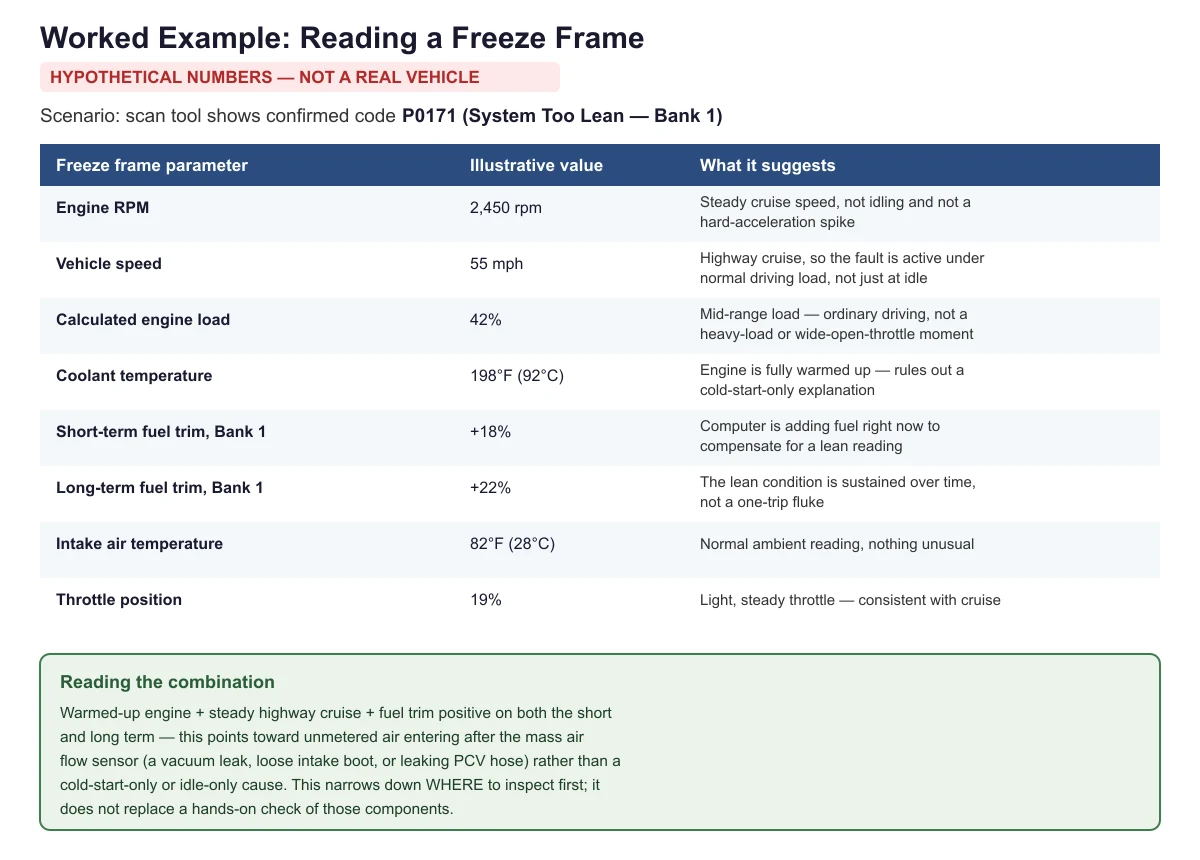
Put together, here’s the reasoning: the engine is fully warmed up, cruising at a steady, moderate speed and throttle, and the computer is adding a meaningful amount of fuel on both the short-term and long-term trims. That combination — sustained positive fuel trim during normal, steady-state driving, not just at idle or during warm-up — points toward air entering the engine somewhere after the mass airflow sensor without being measured. Common sources of that kind of unmetered air include a cracked intake boot, a loose or cracked vacuum hose, or a leaking PCV (positive crankcase ventilation) hose or valve.
That’s a starting point for inspection, not a confirmed fix. Freeze frame data narrows down where to look first; it doesn’t replace actually inspecting those parts by hand, and a different combination of values on your own scanner (say, lean trims only at idle, or only at wide-open throttle) would point toward a different likely area.
What Should You Do With Freeze Frame Data Before Clearing Codes?
Record it first. Under California’s OBD II regulation, once a vehicle already has the maximum number of freeze frames it can store, the system generally may not overwrite the ones it already has — with one exception: for certain model years, a newly stored misfire or fuel system fault code is allowed to replace existing freeze frame conditions. In practice, this means the specific snapshot tied to your code can be lost or overwritten before you get a second look, especially if the car keeps driving and setting new codes.
It’s also erased the moment you clear codes with a scan tool, right along with the code itself. If you’re troubleshooting rather than just trying to turn off the check engine light, write down or photograph the freeze frame values before you clear anything. Our guide on pending vs. confirmed codes covers how a code’s status affects when freeze frame data gets stored in the first place, and our P0420 troubleshooting guide shows this same read-the-snapshot-first approach applied to a different code.
Frequently Asked Questions
Can a scan tool show more than one freeze frame at a time?
Usually not. Most consumer and shop-level scan tools display a single freeze frame, tied to the code that triggered it first. Some vehicles can store a small number of freeze frames internally, but the typical handheld or app-based scanner only surfaces one at a time per code.
Does freeze frame data tell me exactly which part is broken?
No. It tells you what the engine was doing when the fault was detected, which narrows down where to look. Confirming the actual broken part still takes a hands-on inspection, like checking for a vacuum leak, testing a sensor, or verifying fuel pressure.
Why does my freeze frame only show one code when I have multiple codes stored?
Freeze frame is generally tied to the first fault that was detected, not every code currently stored. If a second, unrelated code sets later, it may not get its own freeze frame unless it’s a misfire or fuel system code, which can be allowed to replace the existing snapshot.
Is freeze frame the same thing as live data?
No. Live data updates continuously while you watch the scanner, showing current conditions. Freeze frame is a single snapshot saved at the exact moment a specific code was set, and it doesn’t change afterward, even if current conditions are completely different.
Should I write down freeze frame data even if I’m not a mechanic?
Yes. Even if you can’t interpret every value yourself, giving a mechanic the freeze frame reading alongside the code can save diagnostic time, since it shows the exact conditions present when the fault occurred rather than just the code number alone.
Sources
- Cal. Code Regs. tit. 13, § 1968.2, Malfunction and Diagnostic System Requirements — 2004 and Subsequent Model-Year Passenger Cars, Light-Duty Trucks, and Medium-Duty Vehicles and Engines — checked November 2026
- Wikipedia, OBD-II PIDs, standard Mode 01/02 parameter list compiled from the SAE J1979 standard — checked November 2026
autoscanguide.com Editorial Team. Last updated: November 12, 2026.