The check engine light comes back after clearing a code because clearing only erases the stored record — it does not fix whatever triggered it. If the problem is still happening, the onboard computer detects it again within a few drive cycles (sometimes as few as two) and stores the code once more, turning the light back on.
- Clearing a code erases the stored fault and resets the related monitor to “not complete.” It does not repair anything.
- A fault goes through stages: a pending code on the first detection, then a confirmed code (light on) if the same fault repeats on the next drive cycle, with a matching permanent code saved in protected memory.
- If the underlying problem is real, the whole pending-to-confirmed sequence can repeat within as little as two drive cycles of clearing it.
- The light only turns off on its own after the relevant monitor runs clean for three straight drive cycles — a scan tool’s “clear codes” turns it off sooner, but doesn’t mean the car passed that test.
- A permanent code can’t be erased by a scan tool or a battery disconnect; only the car’s own computer can clear it, once it verifies the repair.
What Actually Happens When You Clear a Code?
Choosing “Clear Codes” on a scanner deletes the stored trouble code and turns the check engine light off immediately. At the same time, it resets the readiness monitor tied to that code back to “not complete,” so the car’s computer has to run that test again from scratch. Clearing the code does not touch the part, sensor, or condition that caused the fault in the first place.
If that underlying issue is gone (a loose gas cap that’s now tightened, a connector that’s now reseated), the monitor can run clean and nothing comes back. If it is not gone, the computer will detect the same fault again as soon as it gets the chance to retest, and the code — and the light — return. If you’re still getting familiar with reading and clearing codes in the first place, our first-time OBD2 scanner guide covers the basic process step by step.
Why Does the Light Follow a Pending-to-Confirmed Pattern?
U.S. and California emissions regulations that define how OBD II systems behave describe three related code statuses, not just one “trouble code.” Under California’s OBD II malfunction and diagnostic system rule (the basis for OBD II requirements nationwide), a pending fault code is “the diagnostic trouble code stored upon the initial detection of a malfunction (e.g., typically on a single driving cycle).” A confirmed fault code follows once the OBD system has confirmed the malfunction is real — typically by detecting it again on the very next driving cycle.
In plain terms: the first time the computer sees a problem, it logs a pending code but leaves the light off. If it sees the exact same problem again before the next drive cycle ends, the code is promoted to confirmed and the light comes on. A permanent fault code is stored in the same step, in protected memory (NVRAM) that a scan tool can’t normally touch.
This matters for a code you’ve already cleared: if the fault is still happening, your car doesn’t need to drive for weeks before the light returns. It can go pending again on your very next trip, then confirmed — light back on — on the trip after that.
EPA’s own consumer guidance describes the other direction of this same idea in plain language: once the system re-checks a component and no longer finds the problem across several evaluations in a row, the dashboard light shuts off automatically without you doing anything. In its own loose-gas-cap example, EPA notes this kind of self-clearing light typically happens within a few days of normal driving — useful context for how long a genuinely fixed problem takes to clear on its own, versus a light that comes right back.
Pending vs. Confirmed vs. Permanent: How Each One Returns
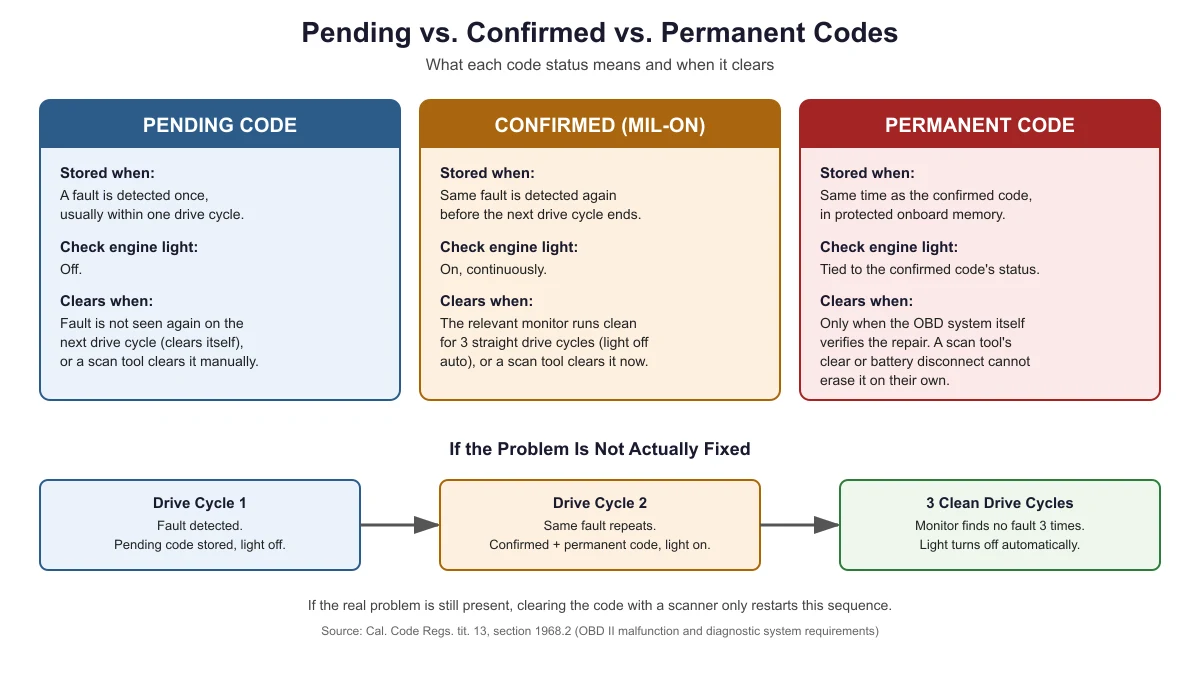
The table and graphic below show the same information: what triggers each code status, whether the check engine light is on, and what actually makes each one clear.
| Code status | Stored when | Check engine light | Clears when |
|---|---|---|---|
| Pending | A fault is detected once, usually within one drive cycle | Off | The fault isn’t seen again on the next drive cycle (clears itself), or a scan tool clears it manually |
| Confirmed (MIL-on) | The same fault is detected again before the next drive cycle ends | On, continuously | The relevant monitor runs clean for 3 straight drive cycles (light off automatically), or a scan tool clears it right away (temporary if the problem remains) |
| Permanent | Stored at the same time as the confirmed code, in protected onboard memory | Tied to the confirmed code’s status, not a separate light | Only when the OBD system itself verifies the repair by completing the relevant monitor; a scan tool’s clear-codes command or a battery disconnect cannot erase it on their own |
Is the Returning Light a Real Re-Fault, or Just a Monitor Still Running?
Before assuming the repair failed, pull the codes again and check these in order:
- Check the status first. If the scanner shows a new pending code and the light is off, the system detected something once and is waiting to see if it repeats — it hasn’t confirmed a re-fault yet.
- Check whether it’s the same code as before. The identical code returning as confirmed within your next couple of drives is the strongest sign the original problem was never actually fixed.
- Check whether it’s a different code. A new code is a separate issue, not proof the first repair failed.
- Check how much driving has happened since the clear. Monitors generally need a mix of driving conditions (idle time, steady highway speed, some stop-and-go) to finish a full test. As a rule of thumb, give the car a few varied trips before assuming the test is finished.
- Check for a permanent code. If the scanner shows “no codes” but a permanent code is still present from before, the car’s computer hasn’t verified the repair yet, even though nothing is currently stored as pending or confirmed.
Why Clearing the Code Again and Again Doesn’t Help
Repeatedly clearing a code that keeps coming back just repeats the same cycle: light off immediately, pending code on the next drive, confirmed code and light on again a drive cycle later. It also erases the freeze frame data saved with that code each time, which is often the most useful clue for figuring out what’s actually wrong. If you’ve cleared a code more than once and it keeps returning as the same code, that’s a sign to look up what the specific code covers and check the related system, rather than clearing it again. Our P0420 code guide walks through one common example of working through a code methodically instead of repeatedly clearing it.
A flashing (rather than steady) check engine light is treated as a more urgent signal by mechanics, often pointing to an active misfire that can damage the catalytic converter. As a general safety precaution, avoid extended or high-speed driving if the light is flashing, regardless of what a scanner shows.
Does a Drive Cycle Mean Just Starting the Car?
No. A drive cycle (sometimes called a driving cycle) is a full trip — engine start, a period of driving, and engine shutoff — and the specific monitor tied to your code needs certain conditions met during that trip (things like minimum speed, idle time, or engine temperature) to actually run its test. Starting the car and immediately shutting it off doesn’t count as a completed cycle for most monitors. This is also why two cars with the “same” fault can see the light return at different speeds: one driver’s typical trip satisfies the monitor’s conditions quickly, and another’s doesn’t. If you want a deeper comparison of how pending and confirmed statuses behave day to day, see our pending vs. confirmed code guide.

Frequently Asked Questions
How soon can the check engine light come back after I clear a code?
If the underlying problem is still present, it can return within as little as two drive cycles: the computer detects the fault again on the next trip (pending), then confirms it and turns the light on if it sees the same fault on the trip after that. Exactly how fast depends on the specific monitor and how you drive.
Does clearing a code reset anything besides the light?
Yes. Clearing a code also resets the readiness monitor linked to that code back to “not complete” and erases the freeze frame data saved with it. The monitor has to run its test again from scratch, and you lose the snapshot of conditions that were present when the fault happened.
Why does my scanner show a permanent code when there are no pending or confirmed codes?
A permanent code is stored separately in protected memory and stays recorded even after a scan tool clear. Seeing one with no other codes active means the car’s computer hasn’t yet completed the monitor needed to verify that the earlier problem is actually fixed, even though nothing is currently pending or confirmed.
If the code comes back as the exact same code, does that mean the repair failed?
It’s the strongest single signal that it did, especially if the code returns as confirmed within your next couple of drives. It’s not absolute proof on its own — a related but separate issue can sometimes trigger the same code — but it’s reasonable to treat it as the original fault still being present and look at that system again.
Can I just keep clearing the code instead of fixing the problem?
You can, but it only turns the light off temporarily and doesn’t change the underlying issue. It also erases freeze frame data each time, making the problem harder to diagnose later, and an emissions test will typically fail if the required monitors haven’t completed and passed — clearing codes repeatedly keeps resetting that progress.
Sources
- Cal. Code Regs. tit. 13, § 1968.2, Malfunction and Diagnostic System Requirements — 2004 and Subsequent Model-Year Passenger Cars, Light-Duty Trucks, and Medium-Duty Vehicles and Engines — checked November 2026
- Cornell Law School, Legal Information Institute, 40 CFR § 86.1806-17, Onboard diagnostics — checked November 2026
- U.S. EPA, Frequently Asked Questions About On-Board Diagnostics (Environmental Fact Sheet) — checked November 2026
autoscanguide.com Editorial Team. Last updated: November 12, 2026.