
“No link detected” means the scanner powered on but got no reply from the car’s computer. Common causes are the wrong ignition position, a blown fuse, a damaged 16-pin port, or a protocol your scanner doesn’t support. Test the scanner on a different car first to find out which side has the problem.
- “No link detected” is a communication failure between the scanner and the car’s computer, not a stored fault code.
- Testing the scanner on a second vehicle is the fastest way to separate a scanner-side problem from a car-side problem.
- On the car side, the most common fixes are the ignition position, a blown fuse, a dirty or damaged 16-pin port, and a protocol your scanner doesn’t cover.
- The OBD2 port’s power pin runs on its own fuse in most vehicles, and that fuse is sometimes shared with another circuit.
- Work through the checks in order rather than guessing; skipping ahead is the most common reason people miss the real cause.
What Does “No Link Detected” Actually Mean?
U.S. federal regulators began requiring OBD systems on light-duty vehicles and trucks starting with the 1994 model year, and by the mid-to-late 1990s that requirement covered essentially every new gasoline and alternate-fuel car and light truck sold in the country — built to a standardized connector and a standardized communication protocol, specifically so independent scan tools can talk to any compliant vehicle without a dealer-only tool. That standardization is what lets one scanner work across different makes and models in the first place.
A “no link detected” or “no communication” message means your scanner sent its initialization signal through the 16-pin port and got nothing back. It is not a diagnostic trouble code and it is not stored in the car’s memory — it is the scanner reporting that the conversation never started. The usual culprits fall into a short list: no power reaching the port, a protocol mismatch between the scanner and the car, a damaged or dirty connector, or a fault in the scanner itself. If you are brand new to using a scan tool, our first-time scanner guide covers the basic connection steps this article assumes you’ve already tried.
Step 1: Is It the Scanner or the Car? Test on Another Vehicle
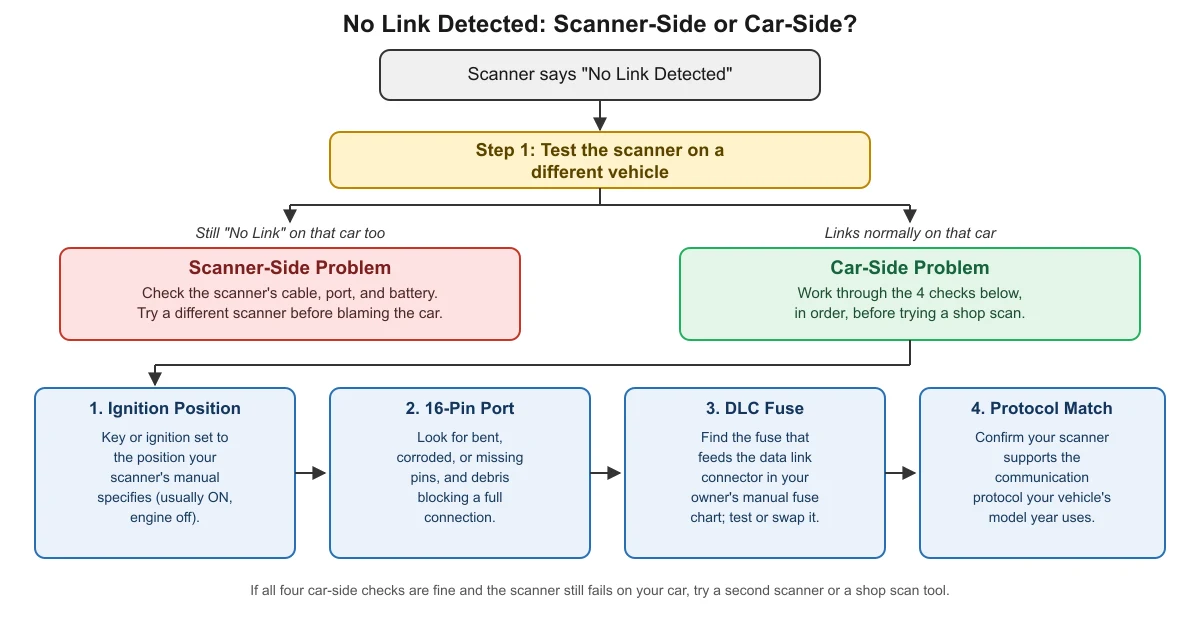
Before checking anything under the dash, do the one test that tells you which half of the problem you’re dealing with: plug the same scanner into a different vehicle, ideally a mainstream car or truck from the last 10-15 years. The result splits your troubleshooting in two directions.
If the scanner links normally on the other vehicle, the problem is on your car’s side — move on to the ignition, port, fuse, and protocol checks below. If the scanner still shows “no link detected” on the second vehicle too, the problem is almost certainly the scanner itself, and no amount of checking fuses in your car will fix it. This single test saves more wasted time than any other step, because it stops you from chasing a car-side fault that doesn’t exist.
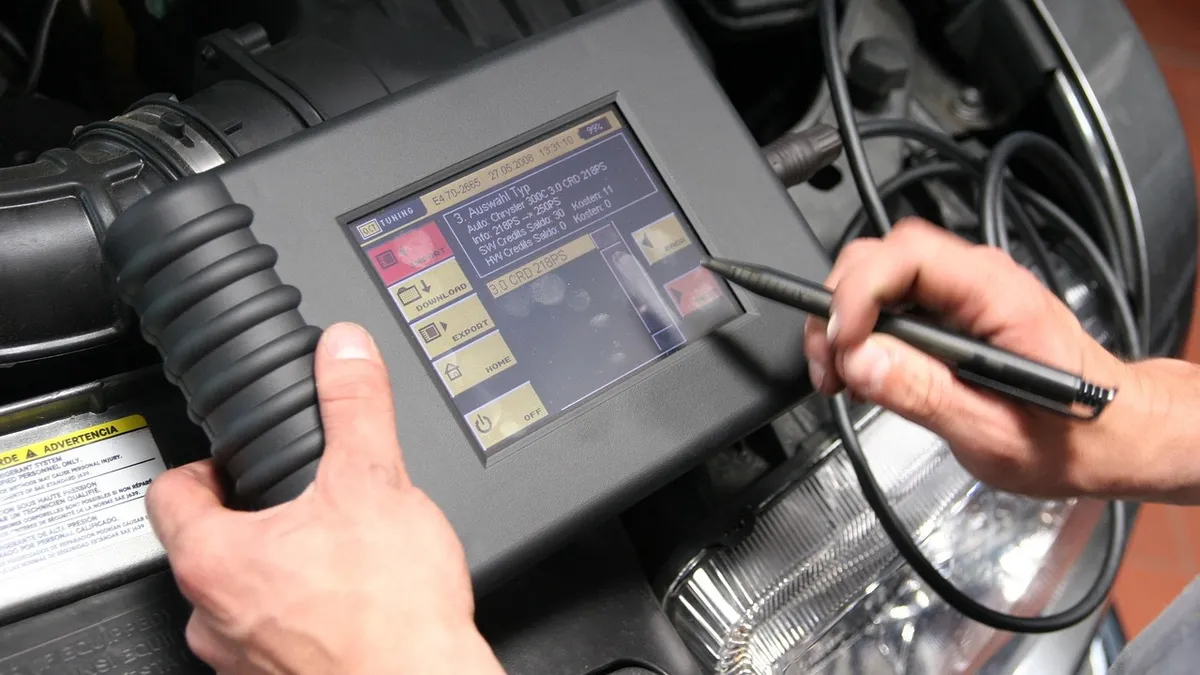
If It’s the Scanner: What to Check
If the second vehicle test points at the scanner, start with the physical basics: inspect the scanner’s own cable and connector for bent pins, cracks, or a loose fit, and make sure the cable is fully seated at both ends. Handheld scanners with an internal battery can also fail to link if that battery is critically low, even while the screen still lights up.
If you’re using a Bluetooth or Wi-Fi OBD2 adapter, a “no link” error is a different failure mode from a pairing failure — an adapter that never pairs with your phone at all is a separate problem with its own fixes, covered in our Bluetooth OBD2 adapter pairing guide. “No link detected” generally means the adapter did connect to your phone or tablet but still couldn’t talk to the car. If a cable scanner fails on two or more unrelated vehicles, treat it as a hardware or firmware problem and check the manufacturer’s support resources rather than continuing to test it on more cars.
If It’s the Car: Check the Ignition Position First
Most car-side “no link” problems trace back to something simple, and the ignition position is the single most common one. Scan tools generally need the ignition in a specific position to read the car’s computer — usually “ON” with the engine off, though the exact requirement varies by scanner and is listed in its manual. Pushing a start button once without fully reaching that position, or leaving the ignition in an accessory-only mode, can produce exactly the same “no link” message as a real fault.
On keyless-start vehicles, this step has an extra wrinkle: the key fob needs to be close enough for the car to recognize it, and you may need to press the start button a specific number of times (without touching the brake) to reach the right ignition stage without starting the engine. Check your owner’s manual for the exact sequence if you’re not sure your car actually reached the position the scanner needs.
Inspect the 16-Pin Port for Damage or Debris
The OBD2 connector is a standardized 16-pin layout defined by SAE J1962, and only a handful of those pins matter for a basic link: two are ground, one carries constant battery power, and (depending on the vehicle’s age) either a pair of CAN bus pins or a single K-line pin carries the actual data. A bent, corroded, or missing pin on any of these can prevent the scanner from completing a connection even though it physically plugs in.
Look into the port itself for dirt, bent pins, or a pin pushed back into its housing, and check that the port is mounted securely rather than hanging loose on its wiring. A loose mount can let the connector seat without actually making firm contact with every pin. If you plug in correctly but still get no response, a damaged or recessed pin is worth ruling out before you assume the problem is electrical.
Check the Fuse That Powers the Port
One of the 16 pins supplies constant battery voltage to run the port itself, independent of the ignition position, and that pin runs through its own fuse in most vehicles. If that fuse has blown, the port has no power at all and a scanner will show “no link detected” no matter how good the connection is otherwise.
That fuse is not always dedicated to the OBD2 port alone. As one real example, a current Ford passenger-car fuse specification chart lists a 15-amp fuse that covers both the data link connector and the steering wheel control module on the same circuit — so a fault in an unrelated system can blow the fuse that also feeds your scan port. Fuse numbers, amperages, and which circuits share a fuse vary by make, model, and year, so check your own vehicle’s owner’s manual for the correct fuse location rather than assuming it matches any example. If you have a multimeter, testing for roughly 12 volts at the port’s power pin with the fuse in place is a quick way to confirm whether power is reaching the connector at all.
Rule Out a Protocol Mismatch
Not every scan tool supports every communication protocol a car might use. Nearly all U.S. vehicles from the 2008 model year forward communicate over a CAN bus, but older vehicles — particularly from the late 1990s and early-to-mid 2000s — may use an older protocol instead, carried on a different pin than CAN. A scanner built only for newer CAN-based vehicles will show “no link” on one of these older cars even though nothing is actually broken.
This matters most on a car you’ve never successfully scanned before, since a protocol mismatch doesn’t “develop” over time — it’s either supported or it isn’t. If your scanner worked on this exact car previously and has now suddenly stopped, protocol support isn’t the likely cause; focus on the fuse and port checks above instead. If you’ve never gotten a link on this vehicle at all, check your scanner’s documentation for the list of protocols and model years it supports before assuming something is damaged.
No Link Detected: Scanner-Side vs. Car-Side Checklist
Here is the full decision flow as a graphic, followed by the same steps in a table.
| Step | What to check | What it tells you |
|---|---|---|
| 1. Test on another vehicle | Plug the same scanner into a different, mainstream vehicle. | Links there but not your car → car-side problem. Fails on both → scanner-side problem. |
| 2. Ignition position | Set the key or ignition to the position your scanner’s manual specifies (usually ON, engine off). | The wrong ignition stage is the single most common cause of a false “no link.” |
| 3. 16-pin port | Inspect for bent, corroded, or missing pins and debris blocking a full connection. | A damaged or dirty port can prevent a complete electrical connection even though the connector plugs in. |
| 4. DLC fuse | Find the fuse that feeds the data link connector in your owner’s manual’s fuse chart; test or replace it. | A blown fuse — sometimes shared with another circuit — cuts all power to the port. |
| 5. Protocol match | Confirm your scanner supports the communication protocol your vehicle’s model year uses. | Rules out a compatibility gap on a car you’ve never successfully scanned before. |
What If You’ve Checked Everything and It Still Won’t Link?
If the ignition position, port condition, fuse, and protocol all check out and the scanner still won’t link, try a second scanner if one is available — a tool-specific fault can look identical to a car-side problem. It’s also worth double-checking that you’re actually plugged into the real 16-pin OBD2 port rather than a similar-looking connector elsewhere under the dash; some vehicles hide the port in an unusual spot, which our OBD2 port location guide covers in more detail.
If a second scanner also fails to link, the issue is likely a wiring fault inside the car rather than anything a driver can safely diagnose further without a wiring diagram and a multimeter. At that point, a shop with a professional-grade scan tool and the vehicle’s wiring schematic is the faster and safer path. Avoid probing or bridging pins inside the port with anything other than a meter lead, since forcing a connection into the wrong pins can damage the car’s wiring harness or control modules.
Frequently Asked Questions
Why does my scanner power on and light up but still say “no link”?
Powering on only means the scanner itself has battery or power from the port’s +12V pin — it doesn’t mean the car’s computer answered back. “No link” happens after that initial power-up, when the scanner tries to start a conversation over the data pins and gets no response. Work through the ignition position, port condition, fuse, and protocol checks above rather than assuming the scanner is broken just because its screen works.
Can a weak or dead car battery cause a “no link detected” message?
Yes. The OBD2 port’s power pin draws directly from the car’s battery, and a battery that’s too weak to supply stable voltage can prevent the scanner from completing its initialization, even if the port and connections are otherwise fine. If your battery is old, slow to start the car, or you’ve had other electrical symptoms recently, test or charge it before spending more time on the scanner itself.
Does every car built since the mid-1990s work with any OBD2 scanner?
Nearly every new gasoline and alternate-fuel car and light truck sold in the U.S. from the mid-to-late 1990s onward has to support a standardized OBD2 connector and protocol, but “standardized” doesn’t mean every scanner supports every protocol variant equally. Older vehicles from that era and the early 2000s sometimes use a communication protocol that a scanner built mainly for newer, CAN-based cars doesn’t cover, which can show up as “no link” on an otherwise healthy car.
Is it safe to keep re-plugging the scanner if it won’t link?
Plugging and unplugging a standard OBD2 connector a few times is not dangerous by itself. What isn’t safe is forcing a connector that doesn’t seat easily, or probing inside the port with anything other than your scanner’s connector or a multimeter lead, since that can bend pins or short unrelated circuits. If the connector doesn’t seat cleanly after one or two careful attempts, stop and inspect the port rather than forcing it.
Sources
- International Council on Clean Transportation, Transport Policy, US: On-Board Diagnostics — checked November 2026
- iMatrix Systems, OBD2 Protocols, Connectors & Diagnostic Services (citing SAE J1962:2016) — checked November 2026
- Ford Motor Company, Owner’s Manual Fuse Specification Chart (one model’s example only) — checked November 2026
autoscanguide.com Editorial Team. Last updated: November 12, 2026.

1 COMMENTS