
A pending code means a fault was detected once; the check engine light stays off. A confirmed code means the same fault repeated, so the light turns on. A permanent code locks in alongside a confirmed code and can’t be erased by a scan tool. “Stored” is a scan-tool menu label, not a separate official status — it usually just means confirmed.
- Pending: fault detected once, usually within one drive cycle. Light off.
- Confirmed: the same fault repeats, typically on the next drive cycle. Light on, continuously.
- Permanent: stored at the same time as a confirmed code, in protected memory (NVRAM). Can’t be cleared with a scan tool or a battery disconnect.
- “Stored” isn’t a fourth official code type. It’s a menu label some scan tools use for codes already logged in memory — usually confirmed codes, sometimes permanent ones too.
- Knowing which status you’re looking at tells you whether to act now, wait and recheck, or just keep driving normally.
What Is a Pending Code?
A pending code is the first flag your car’s onboard computer raises when it notices something off. Under California’s OBD II regulation — the basis for OBD II requirements nationwide — a pending fault code is defined as the code “stored upon the initial detection of a malfunction (e.g., typically on a single driving cycle) prior to illumination of the MIL.” In plain terms: the computer saw a problem once, during one trip, and hasn’t confirmed it yet. The check engine light does not turn on for a pending code alone.
This is useful information even though it isn’t urgent. If you’re learning to read codes for the first time, our first-time OBD2 scanner guide walks through where pending codes show up on a typical scan and how to tell them apart from other code types on the screen.

What Is a Confirmed Code, and Why Does “Stored” Usually Mean the Same Thing?
A confirmed code is what a pending code becomes once the OBD system verifies the fault is real. The same regulation defines a confirmed fault code as the code stored once the system has confirmed a malfunction exists, typically on the second driving cycle in which the fault is detected. Once a code is confirmed, the check engine light illuminates and stays on continuously until the fault clears or a scan tool resets it.
“Stored” is not a term the regulation defines as its own code status. It shows up as a menu label on many scan tools — sometimes as a “Stored Codes” or “History Codes” screen, separate from the “Pending Codes” screen. As a rule of thumb, when a tool’s menu shows a stored-codes list, it is almost always displaying confirmed codes (and sometimes permanent codes alongside them), not a distinct fourth category. The practical lesson: don’t assume “stored” tells you anything different from “confirmed” just because your particular tool uses that word. Check the code’s actual status indicator (often a letter or icon next to the code) to be sure.
This distinction matters if your scanner shows no pending or confirmed codes at all but the light is still on, or vice versa. Our guide to a scanner showing no codes with the light on covers that specific troubleshooting path in more detail.
What Is a Permanent Code, and Why Can’t You Clear It?
A permanent code is stored at the same moment as a confirmed code, but in a separate, protected part of the computer’s memory (NVRAM) that a scan tool’s “clear codes” command cannot touch. Federal regulation (40 CFR § 86.1806-17) requires OBD systems to “identify the confirmed and permanent DTCs set by the OBD system during testing,” treating permanent codes as something a technician needs visibility into separately from codes that can simply be erased.
A permanent code does not have its own separate warning light; its presence is tied to the confirmed code it was stored with. The only way to clear it is for the vehicle’s own OBD system to verify, on its own, that the problem is actually fixed — by running the relevant monitor clean. Disconnecting the battery does not work either, since the data lives in non-volatile memory designed to survive a power loss. If you’ve tried a battery disconnect expecting a fresh start, this is exactly where that approach falls short for a permanent code. It’s also worth knowing that clearing a code with a scan tool resets the light immediately but doesn’t fix anything; our guide on why the check engine light comes back after clearing a code covers how fast a cleared fault can go from pending to confirmed again if the underlying problem is still there.

Pending vs. “Stored” vs. Confirmed vs. Permanent: Side by Side
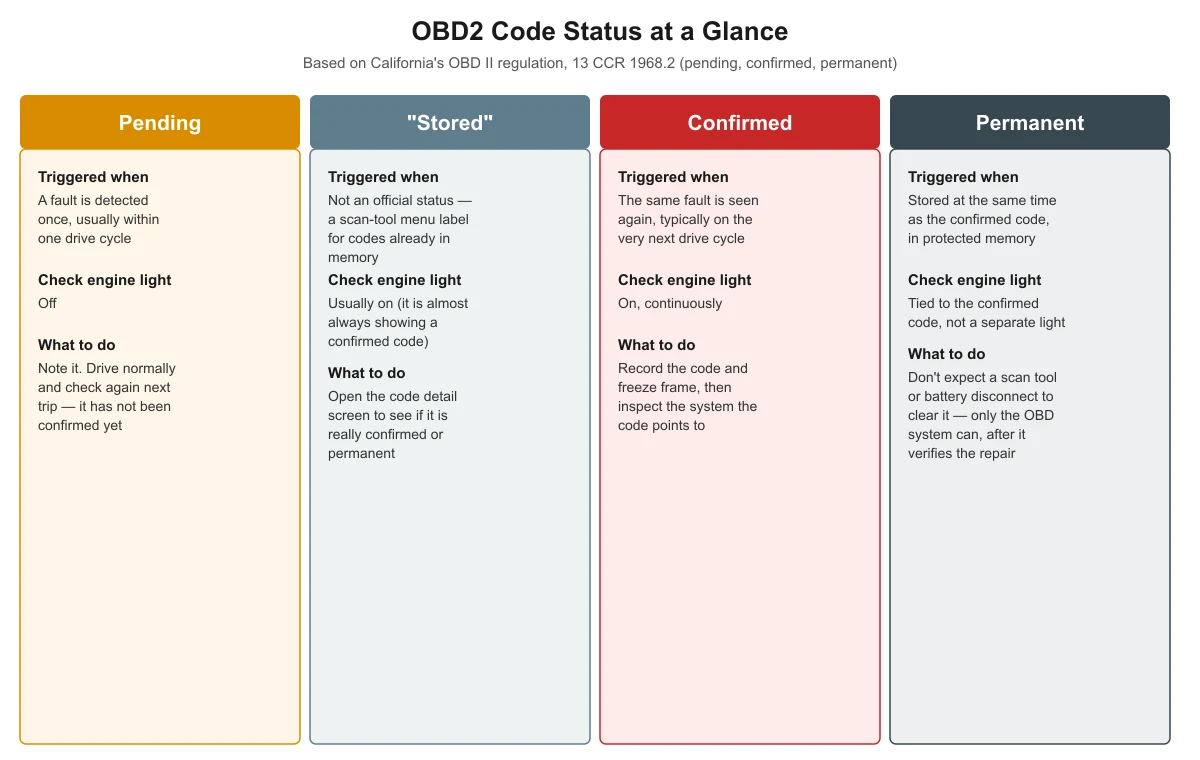
The table and the graphic below show the same information in two formats: what triggers each code status, whether the check engine light is on, and what a driver should actually do about each one.
| Code status | Triggered when | Check engine light | What to do |
|---|---|---|---|
| Pending | A fault is detected once, usually within one drive cycle | Off | Note it and drive normally; check again on your next trip to see if it repeats |
| “Stored” (scan-tool label) | Not an official status — a menu term for codes already logged in memory | Usually on, since it is almost always showing a confirmed code | Open the code’s detail screen to see whether it is actually confirmed or permanent |
| Confirmed | The same fault is detected again, typically on the next drive cycle | On, continuously | Record the code and freeze frame data, then inspect the system the code points to |
| Permanent | Stored at the same time as the confirmed code, in protected onboard memory (NVRAM) | Tied to the confirmed code’s status, not a separate light | Don’t expect a scan tool or battery disconnect to clear it; only the OBD system can, once it verifies the repair |

What Should You Do When You See Each Code Type?
Treat the status as your guide to urgency, not just the presence of a code:
- Pending, light off: there’s no need to panic or rush to a shop. Keep driving normally and plug the scanner in again after your next trip or two. If the code is gone, the fault didn’t repeat.
- Confirmed or “stored,” light on: the fault has been verified. Write down the code and, if your tool supports it, the freeze frame data — the snapshot of engine conditions when the fault was confirmed. That snapshot is often the most useful clue for narrowing down the cause before you start swapping parts.
- Permanent code present, no pending or confirmed codes showing: this usually means a problem was recently detected and is not yet verified as fixed, even though nothing is currently active. Give the car more varied driving (a mix of city and highway driving, with some idle time) so the relevant monitor can finish its test.
- A flashing (not steady) check engine light: treat this as more urgent regardless of what the scanner shows. A flashing light is commonly associated with an active engine misfire, and mechanics generally advise against sustained high-speed driving until it’s checked.
If you’re not sure where any of these screens are on your particular tool, work through a full scan slowly and check each menu rather than assuming “no codes” on one screen means nothing is stored anywhere.
Frequently Asked Questions
Does a pending code mean something is definitely wrong with my car?
Not necessarily. A pending code means the computer detected a fault once, which can sometimes be a one-time fluke — a loose gas cap, a sensor glitch, or driving conditions that briefly confused a monitor. If the code doesn’t return as confirmed within your next few trips, it was likely a one-time event rather than an ongoing problem.
Why does my scanner show a code as “stored” instead of “pending” or “confirmed”?
Different scan tool brands use different menu wording. “Stored” is a common label some tools use for any code already logged in memory, which in practice is almost always a confirmed code (and sometimes a permanent one). It is not an official regulatory status separate from pending, confirmed, and permanent.
Can a scan tool clear a permanent code?
No. A permanent code is stored in protected memory specifically so a scan tool’s clear-codes command can’t erase it. It stays recorded until the vehicle’s own OBD system verifies the repair by running the related monitor successfully, which also rules out disconnecting the battery as a shortcut.
If my scanner shows no pending or confirmed codes, could there still be a permanent code?
Yes. A permanent code is stored separately and can remain even when nothing is currently active as pending or confirmed. Seeing one by itself usually means the OBD system hasn’t yet completed the monitor needed to confirm a past repair, not that a new problem exists.
How long does it take a pending code to become confirmed?
Under the regulation that defines these statuses, a confirmed code is typically set on the second driving cycle in which the same fault is detected, so it can happen as soon as your very next trip. The exact timing depends on the specific monitor and the driving conditions it needs to complete its test.
Sources
- Cal. Code Regs. tit. 13, § 1968.2, Malfunction and Diagnostic System Requirements — 2004 and Subsequent Model-Year Passenger Cars, Light-Duty Trucks, and Medium-Duty Vehicles and Engines — checked November 2026
- Cornell Law School, Legal Information Institute, 40 CFR § 86.1806-17, Onboard diagnostics — checked November 2026
autoscanguide.com Editorial Team. Last updated: November 12, 2026.





1 COMMENTS